




FAQ
This FAQ is divided into multiple segments. Click on the links below to jump between segments.
2FA Push for NUS WebVPN
-
What is happening?
2FA Push makes it easier for you to log in to WebVPN. Instead of entering your 6-digit security code manually, you simply need to approve the login via your mobile phone. This service only works if your 2FA VIP application is installed on your mobile phone. Click here for a step-by-step guide on how to use it. -
Is there any mobile setting I need to enable for this feature to work?
No, the required setting is already enabled by default on your 2FA VIP application on your mobile phone. -
If I did not receive notification request to approve my sign in, what should I do?
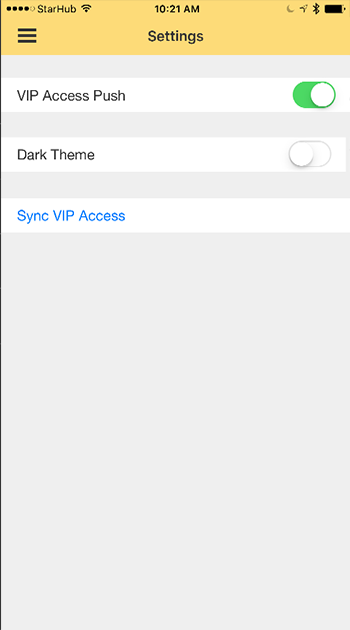
Please refer to the instructions below to verify that VIP Access Push is enabled on your 2FA VIP application on your mobile.
-
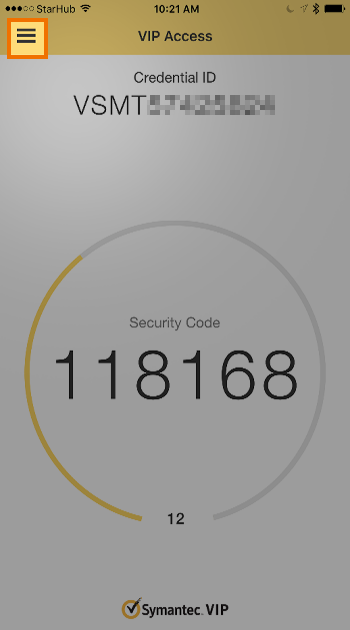
Launch the VIP Access app on your mobile and tap on the menu button at the top-left corner of your screen.
-
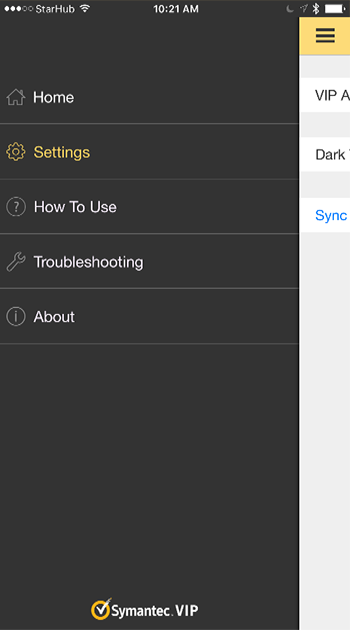
Tap on Settings.
-
Ensure that VIP Push Access is enabled.
-
Launch the VIP Access app on your mobile and tap on the menu button at the top-left corner of your screen.
-
If my 2FA VIP application is installed on my desktop, will this work?
No, this feature is only available if you have installed 2FA VIP application on your mobile. -
Can I migrate my 2FA VIP application to my mobile?
Yes you can. Follow the steps below: -
How do I access the NUS WebVPN portal?
You can access NUS WebVPN portal at: https://webvpn.nus.edu.sg