


GETTING TO KNOW 2FA
Two Factor Authentication (2FA) is an additional layer of security the University is introducing to verify your online identity for sensitive NUS services. With 2FA, you will be required to provide a unique Security Code for accessing these services. This is in addition to your existing NUSNET UserID and Password.
HOW DOES 2FA PROTECT ME BETTER?
With 2FA, should your NUSNET UserID and password be compromised for any reason, the ‘intruder’ will still need the Security Code to access eServices such as ePayslip and leave applications or documents shared on Sharepoint 2013. This limits considerably what hackers are able to do with NUSNET UserIDs and passwords obtained via fraudulent means such as phishing or spyware.
What is VIP?
NUS leverages on Symantec’s VIP (Validation and ID Protection) Service for 2FA. Symantec’s VIP Service is a leading cloud-based strong authentication service that enables enterprises to secure access to networks and applications while preventing access by malicious unauthorized attackers.
Symantec’s VIP Service uses a few terms that might be unfamiliar to you. Below are simplified descriptions of the components that make up Symantec’s VIP Service.
VIP Access
VIP Access is a program (for desktops and laptops) or app (for smartphones and tablets) that you will need to download and install into your chosen device. VIP Access will generate the Security Code that you will need to log in to our 2FA-protected systems.
VIP Credential
Your chosen device, with VIP Access installed, is also known as your VIP Credential. You are only allowed to register ONE VIP Credential at any one time. You can manage your VIP Credential in the VIP Portal.
VIP Portal
VIP Portal, or its full name VIP Self-Service Portal (VIPSSP), is the website where you begin your enrolment in NUS 2FA. It is also where you register, de-register and test your VIP Credential.
WHich NUS systems will be 2fa-protected?
A growing number of sensitive online services, applications and systems will require 2FA to access, including but not limited to:
- Staff Portal e-Services (eg. ePaySlip, facilities booking, leave application).
Click here to see where eServices are located.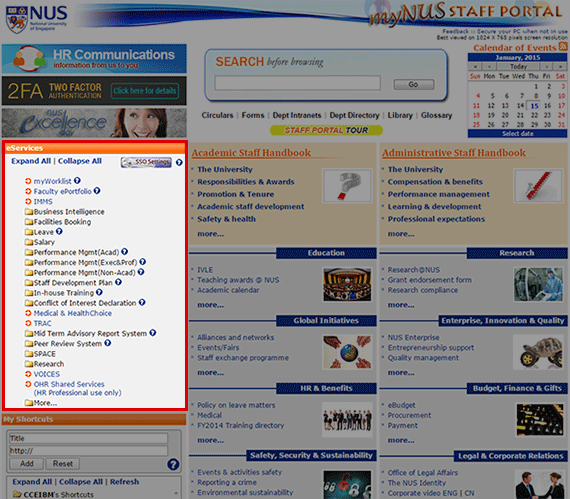
- ISIS for staff
- SAP client, which is the non-web Graphical User Interface to access advanced SAP functionalities
- New SharePoint 2013 (for staff only)