 |
|
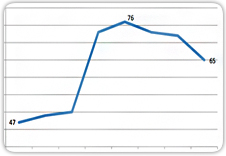
1. Reversing The Rising Tide of Power Consumption
The heart of NUS IT infrastructure lies in its data centres (DC). The power-intensive IT equipment in the DCs typically takes up a huge amount of electricity since they are operating 24 by 7.
|
 |
 |
|
2. Wireless Access For Invited Guests
Thanks to the pervasive wireless coverage on campus, NUS faculty, staff and students can stay connected anytime and anywhere using their NUSNET account. But what about invited guests who are here for a short period of time? Or participants of special events organized by NUS who do not have NUSNET accounts?
|
|
 |
|
3. Research Computing Cost Estimation
With the rapid growth of computational based research in NUS, researchers are often required to estimate the cost of their computing requirements whenever they submit a research proposal or apply for a research grant. This article discusses some of the items to consider when estimating the cost of research computing.
|
|
 |
|
4. All It Needs Is A Simple Verification Email
As he worked on his computer, he saw it. It was an email from helpdesk. It informed him that there was a problem with his account. He was asked to click on the link provided, where he was brought to the web site and was asked to enter his ID and password. He did as instructed and went back to his work.
|
|
 |
|
5. More Contents On NUS iTunes U
More than 800 universities have active iTunes sites today. About half of these institutions – including Yale, Stanford, MIT, Oxford, and UC Berkeley, distribute their content publicly on the iTunes U.
|
|
 |
|
6. Need Help With Your Website?
A well-designed and updated website can provide timely updates to users and project the right image for NUS. To design, revamp or maintain a website requires specific IT knowledge.
|
|
 |
|
7. Tips and Tricks
How do I print screen on a Mac?
Windows users normally ask this question when they switch over to a Mac since there is no print screen button on a Mac keyboard. Here are a few ways on how you can do a print screen on a Mac computer.
|
| |



 RSS FEED



