




Replace 2FA
If you have recently changed your mobile phone or your credential before removing it from VIP Self Service Portal, please follow the instructions below:
-
Go to the URL https://2fa.nus.edu.sg.
-
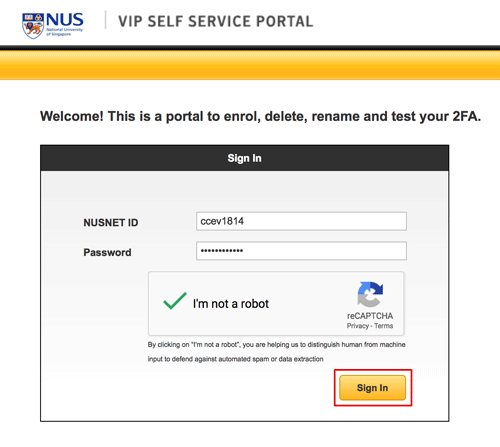
Enter your NUSNET UserID and Password. Click on "I'm not a robot" followed by "Sign In".
-
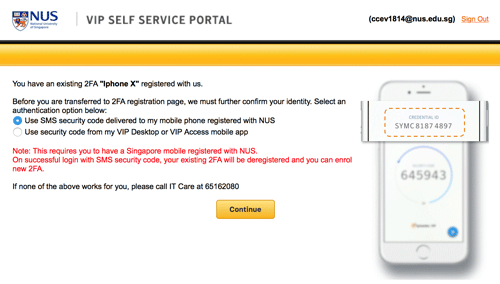
Select first authentication option and click on "Continue" button.
-
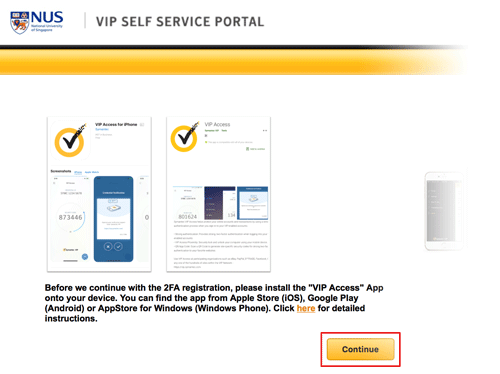
Click on the "Continue" button.
-
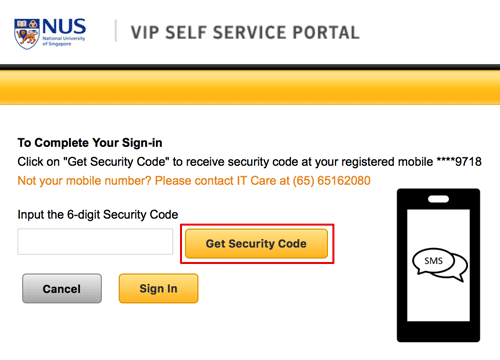
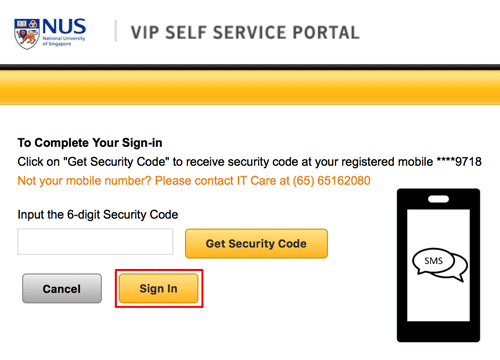
Verify your phone number displayed. Click Get Security Code.
-
A temporary Security Code will be sent to your mobile.
Note
- The temporary security code is sent from NUS.
- The temporary security code is valid for 15 minutes.
-
Enter the security code received via SMS to the VIP Portal's "Input the 6-digit Security Code" field and click on the "Sign In" button. If you do not receive security code, click on "Resend Security Code".
-
Continue with Registering credential.