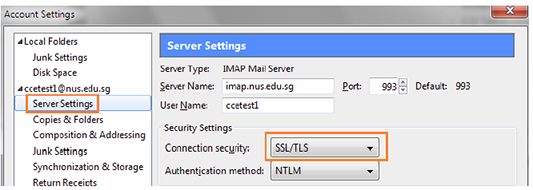
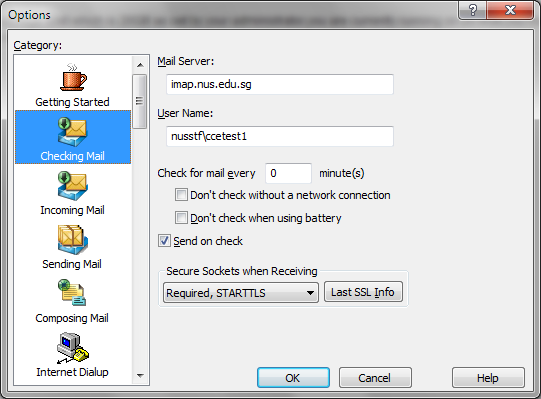
Are you using non-Outlook email client such as Apple Mail, Thunderbird, Eudora etc. to read your NUS emails? If you do, please read on.
If you are using Microsoft Outlook Client and other mobile devices such as BlackBerry, iPhone, Android and Windows Phone you will not be affected.
Non-Outlook email clients allow you to download your email from the email server. The email transfer between your email client and email server is in clear text. You have the option to turn on secure connection, otherwise known as Secure Socket Layer protocol (SSL). With SSL turned on, the communication between your email client and the email server is now encrypted. If someone eavesdrops your traffic, the attacker would not be able to get any useful information. Popular free email service such as Gmail, Yahoo etc. now requires SSL to download the email.
Referring to the prior email of 6 May, we encourage all staff using Non-Outlook clients to enable the secure connection for a secure email communication by 31 May. Email client without SSL will no longer be able to get the email after this date.
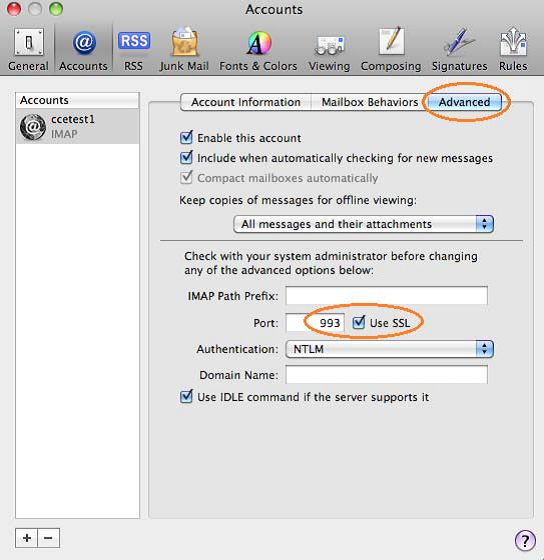
For Apple Mail, set the IMAP port to 993 and click the option Use SSL. This can be found under the Advanced tab in the Accounts setting. |



 RSS FEED